Gartner expects 40% of enterprise applications to run task-specific AI agents by the end of 2026, up from less than 5% in 2025. That is one of the steepest adoption curves enterprise software has seen. The harder question for most companies is not whether to adopt agents but which work to point them at first.
Most companies already digitized their record-keeping years ago. CRMs hold the customer data, ERPs hold the financials, and document management holds the contracts. What stayed manual is the work that sits on top of those systems: reading, comparing, checking against policy, and deciding what happens next. A contract still gets reviewed clause by clause. A supplier still gets vetted by hand. Enterprise AI agents change which part of that work software can take over.
Trying agents out and actually running them in production are two different things, and the distance between them is wide. McKinsey’s State of AI 2025 backs that up: 62% of organizations are already experimenting with agents, but only 23% are scaling them in at least one business function.
This article covers what legacy-to-agent transformation means, how to tell whether your workflow is a fit, seven business process automation examples where agents already replace manual work, how a build actually runs, what it costs, and where to start.
What is legacy-to-agent transformation?
Legacy-to-agent transformation is the process of replacing manual knowledge workflows in established companies with enterprise AI agents that can read the relevant inputs, reason about them, plan a sequence of steps, and act on the company’s existing systems. It’s one specific kind of build: a software system that takes over work an employee used to do, not a new AI product and not a chatbot on a website.
Most advice on AI agents assumes a greenfield project, where the application is designed around AI from day one. A company that already operates has none of that freedom. The workflow exists. The data lives in CRMs, ERPs, and document systems chosen years ago. Compliance obligations were set long before anyone said the word agent. That changes the project in four ways:
- Data access is bounded by existing systems. The agent reads and writes against systems your team already uses, not ones you design freely.
- Governance inherits existing rules. SOX, HIPAA, GDPR, and financial services controls are already in place before the project starts.
- Failure cost is higher. A demo can fail charmingly. A production workflow that breaks costs the business revenue this quarter.
- Institutional knowledge has to be extracted, not designed. What senior employees know often never got written down.
How enterprise AI agents differ from RPA and chatbots
Enterprise AI agents perceive their environment, reason about it using large language models, plan a sequence of actions, and carry those actions out on enterprise systems.
RPA follows scripted rules on structured input and breaks the moment a field moves or a document format changes.
Chatbots answer questions but don’t act: a chatbot tells a customer their balance, and an agent updates the account and processes the refund.
| What it handles | Where it breaks | |
|---|---|---|
| RPA | Structured input, fixed sequences of clicks and fields | Any change to the form, layout, or exception that it was not scripted for |
| Chatbots | Unstructured questions, conversational answers, retrieval | Taking action, they answer but do not execute work on systems |
| AI agents | Unstructured input, judgment calls, multi-step plans, action on systems | Poorly scoped tasks and missing guardrails, not input variability |
An enterprise AI agent reads inputs that arrive in any format, exercises judgment about what they mean, plans the steps needed, and takes action.
RPA still wins on high-volume, structured, rules-only tasks. The agent earns its place on the work RPA never could touch, where the input is messy and the decision requires reasoning.
How to know if your workflow is ready for AI agent automation
Not every manual workflow is a good candidate, and picking the wrong one is how pilots stall. Gartner expects more than 40% of agentic AI projects to be canceled by the end of 2027, largely from unclear value and poor scoping. A workflow that is worth automating tends to show most of these signals:
- Knowledge intensity. The work means reading, comparing, and reaching a conclusion from several sources, not just moving data between systems.
- Repetitiveness. The workflow runs at least 20 to 30 times a week. Below that, the build pays back too slowly.
- Context-switching cost. Senior people spend hours hopping between documents and systems to finish one instance.
- Documentation footprint. There are policies, playbooks, or past examples the agent can learn the standard from.
- Output structure. The workflow produces a recognizable artifact: a memo, a redline, a score, a recommendation.
- Stable inputs. The types of input don’t change every week. Volume and messiness are fine; the underlying types need to hold steady.
If you match most of these, you have a candidate.
Eastern Peak’s AI Readiness Assessment scores your workflow against this framework in about five minutes and hands back a category recommendation.
Business process automation examples: 7 workflows AI agents replace today
These are the categories where agent builds already pay off across mid-market and enterprise clients, from financial and professional services to regulated industries and procurement.
Contract review
Mid-market law firms and in-house counsel review thousands of contracts a year, each one eating one to four hours of a junior associate’s time: compare clauses to the firm playbook, flag risky language, draft redlines, send to a partner.
The agent reads a stack of contracts at once and pulls the clauses that matter: change-of-control, indemnity caps, termination rights. It checks each one against your playbook, marks what is missing or off-standard, and routes the rest to a lawyer, who reviews a finished draft instead of writing one.
Eastern Peak builds AI agents for legal teams that handle contract review and plenty of other workflows like it.
Due diligence and investment memo preparation
Analysts at PE firms, VC funds, and M&A teams read through a data room of hundreds of documents to work out what a target is really worth.
The agent reads the data room, pulls the terms that affect the deal value, checks them against the financials, and writes a first-draft memo with the risks already flagged. The deal team starts from a draft instead of a blank page.
Insurance underwriting and quote generation
Underwriters collect application data, third-party reports, and loss history, then price the risk against the rulebook, often pulling from several systems that do not connect.
The agent gathers everything into one place, checks it against your underwriting rules, and prices the straightforward cases. Anything unusual goes to an underwriter with the data already lined up. The routine quotes come off their desk.
Compliance and regulatory monitoring
Compliance teams have to spot new regulations, work out which ones apply, and update the affected policies. It never stops, and it is easy to fall behind.
The agent watches the regulatory sources, flags what affects your business, links each change to the policies it touches, and drafts the update for a compliance officer to approve. It runs continuously, so nothing slips while the team is busy elsewhere.
Market research and competitive intelligence
Analysts track what competitors are doing, pricing, launches, hiring, press, and turn it into a regular briefing.
The agent collects all of it, writes a clear brief, and refreshes it on the schedule you set. Your analyst spends the time reading the market instead of compiling it.
Vendor scouting and supplier intelligence
A procurement team lines up candidate vendors for a category, gathering capabilities, certifications, pricing, references, and financial-health indicators, then runs an RFI and shortlists. The early stages take weeks.
The agent searches against your requirements, pulls each candidate’s background and risk data, scores them on the same criteria, and hands procurement a shortlist with the reasoning attached. The procurement lead negotiates and decides, with the days of legwork already done.
Venue sourcing and event proposals
Event agencies run the same cycle for every brief: find venues and vendors that fit, email each one to confirm availability and pricing, chase the ones that go quiet, and then compile everything into a client proposal. Producers lose days per event on the back-and-forth alone.
The agent finds matching venues and vendors, sends the availability emails, follows up on the replies, and compiles the offers into a comparison with a first-draft proposal attached. Your producer picks the shortlist and presents to the client. The agent never makes the final call and never talks to your client directly.
Eastern Peak builds AI agents for event agencies around this workflow, along with attendee comms and post-event reporting.
How an enterprise AI agent build actually works
Eastern Peak builds enterprise AI agents one workflow at a time, in four phases over six to eight weeks. The scope stays narrow, and you sign off at every milestone, which is what gets a working agent into your team’s hands in weeks, instead of turning into a project that runs all year. Every AI business process automation build runs through these phases:
- Weeks 1-2: Discovery. We map the workflow you want to automate, connect to the systems where your data already lives, and pick the first agent to build. This is where we pull out the standard your team works to, the playbook, the rules, and the judgment calls, especially the parts that were never written down.
- Week 3: Design. We turn the agent’s steps and the screens around them into a clickable prototype so you can see how it will work before any production code gets written.
- Weeks 4-6: Build. We develop fast using AI, with testing and accuracy checks built into the workflow. The agent connects to your existing tools, whether that is Salesforce, a document system, or an older in-house tool you have run for years.
- Weeks 7-8: Launch. You get a working first version, plus handover, training for your team, and a plan to grow the agent’s scope from there.
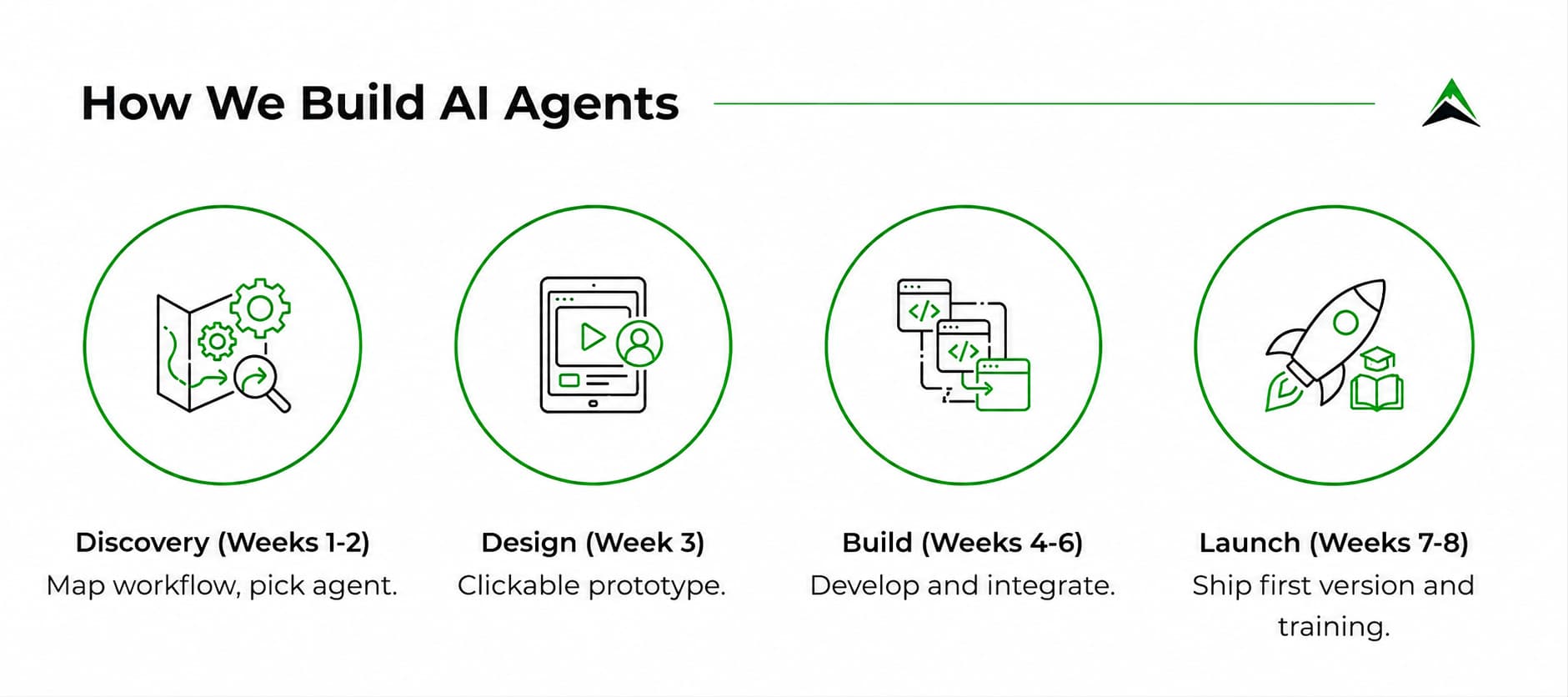

Two things hold across every build:
- Human approval is built in from the start. We design the sign-off points into the workflow during discovery, so the points where the agent stops and waits for a person are part of the plan from day one. The agent drafts and routes; your people decide.
- We build it to be yours. The agent runs on your systems and is handed over as code you own, with full repo access. There is no proprietary platform underneath it, so you are not building on something you have to keep renting.
How much does an enterprise AI agent cost?
Pricing is fixed and agreed upfront, so you know the number before the build starts. What it comes to depends on the workflow you pick and the systems it has to connect to. The timeline barely moves either way: a first working version is six to eight weeks because the build takes on one workflow at a time.
Where to start with AI business process automation
Start by picking one workflow, not the whole business. Run it against the readiness signals:
- Knowledge-intensive. Someone has to read the inputs and form a judgment before anything can move. If the task is pure copying between fields, RPA is the cheaper answer.
- Repetitive at volume. The same task comes up often enough that the build pays back.
- Expensive to context-switch through. Senior people lose hours hopping between systems to finish one instance.
- Well documented. A policy, playbook, or set of past examples exists for the agent to learn the standard from.
- Clear definition of done. A finished output has a recognizable shape: a memo, a redline, a score.
- Reviewable by a person. Someone can tell a good output from a poor one and sign off before it’s used.
The best first candidate is usually a workflow senior people find tedious, where the standard is already written down and where a wrong draft gets caught at review before it reaches a customer.
Handing a workflow your team has run for years over to an agent can feel like a risk worth putting off. In practice, it rarely is. We’ve spent over a decade building production software for clients across different industries, and our team builds custom AI agents grounded in that experience.
Contact us for a free consultation, and we will help you identify which of your manual workflows is the right first candidate for an AI agent.
Frequently Asked Questions
What is an AI agent?
An AI agent is software that carries out a multi-step task by deciding what to do at each step. It uses a large language model to interpret a goal, work out the steps, gather the information it needs, and produce a result, pausing for approval where a human decision matters.
It handles unstructured inputs and makes judgment calls, rather than following a fixed script.
How are enterprise AI agents different from RPA?
RPA follows fixed rules on structured input and breaks the moment a field moves or a document format changes.
An enterprise AI agent reads input in any format, reasons about what it means, and makes judgment calls, so it handles the messy, unstructured work RPA cannot.
RPA still wins on high-volume, structured, rules-only tasks; agents earn their place where the input is messy and the decision requires reasoning.
What workflows are good candidates for AI agent automation?
The workflows worth automating are the ones your team repeats constantly but that never quite fit a fixed script. Inconsistent documents and emails, tickets that need sorting, research pulled together from a dozen places, knowledge-base questions, processes that hop across several systems before they’re done.
The pattern to look for is simple: high volume, enough complexity that judgment matters, and room for a person to review the output while the agent proves itself.
How long does it take to build an enterprise AI agent?
A well-scoped pilot on a single workflow can reach users in a matter of weeks, because the point of a pilot is to keep the scope narrow and to keep a human in the loop.
Read also: